Quetzly Validator for Chrome
The Quetzly Validator for Chrome brings instant ArcGIS service health checks directly into your browser — no desktop app required.
What can you do with the Chrome Extension?
- Validate any ArcGIS REST service with one click
- Detect broken layers, empty services, and misconfigured extents
- Generate full directory PDF health reports
- View pass/fail assertion results with color-coded icons injected directly into the ArcGIS REST page
- Hover over any icon to see a detailed tooltip of what passed and what failed
Who is it for?
Quetzly is a versatile toolkit for anyone interacting with ArcGIS services. From real-time health monitoring and configuration debugging to generating stakeholder uptime reports, it streamlines the entire lifecycle of service validation. Whether you are verifying data presence or confirming integration readiness, Quetzly provides instant, browser-based insights.
How it works
When you navigate to an ArcGIS Server REST endpoint, Quetzly detects the context (root directory, folder, or individual service) and enables the appropriate checks. Click Validate Current Service to run assertions. Results are injected directly onto the page as 🟢 / ⚠️ / 🔴 icons with hover tooltips.
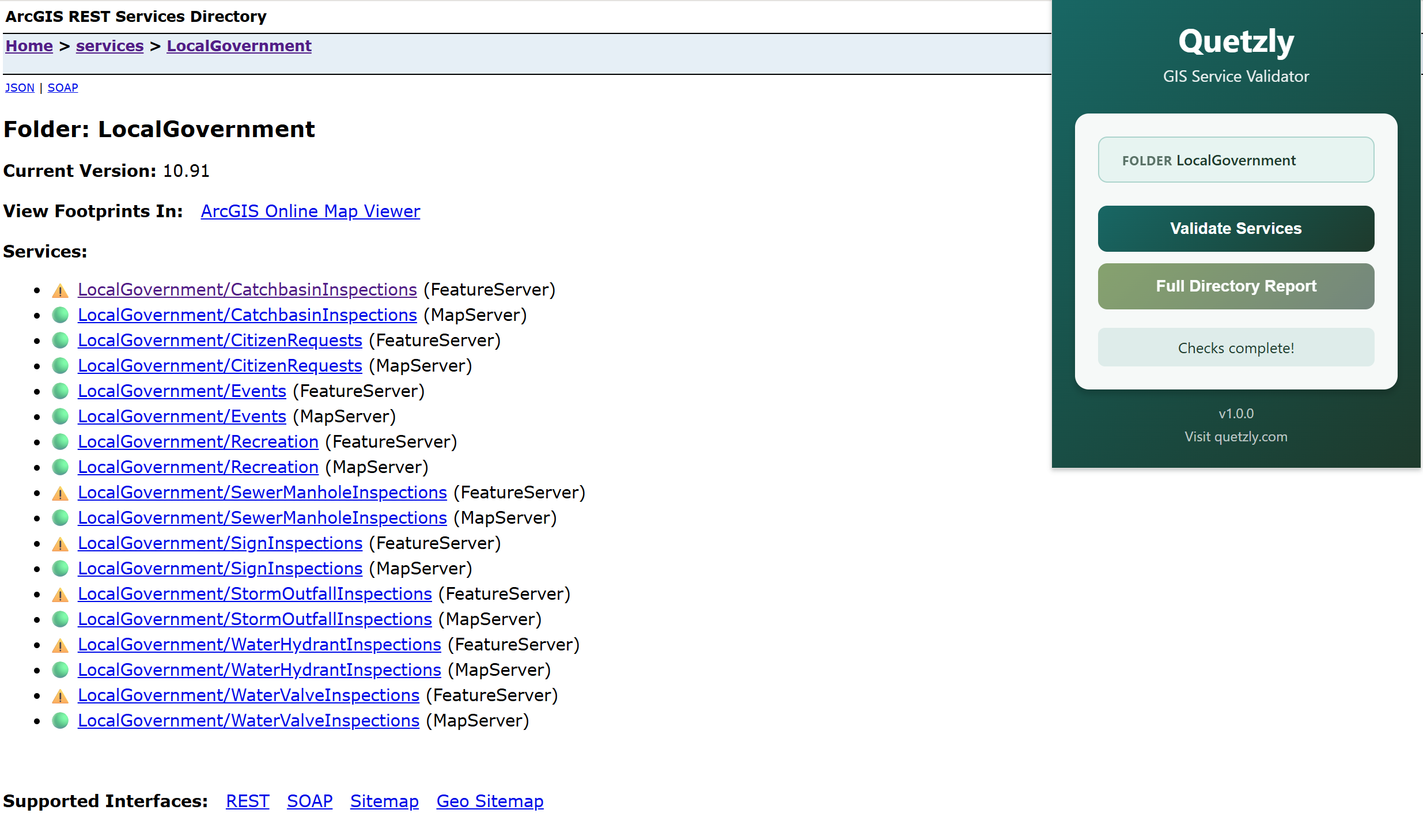 Service Validation